






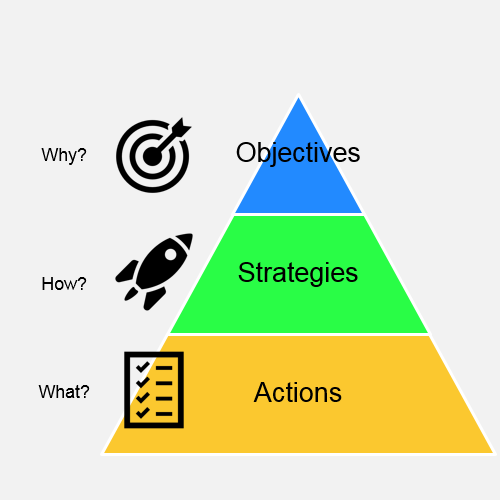
EXCERPTS...
Purpose of this document
- To propose a set of definitions and terminology that can be used for developing frameworks for breed improvement
- To summarise the currently available frameworks that breeds can use to plan for improvement
There are examples of Breed-specific Breeding Strategy documents (e.g. RAS, JTO) which provide good starting templates for others to use.
- FKC Breeding Strategy TEMPLATE for Breeds with Large Populations
- Norwegian Kennel Club RAS TEMPLATE English
The UK KC also has a Strategy Guide (The Kennel Club Breed Health Improvement Strategy - A Step by Step Guide) with template examples and now has Breed Health and Conservation Plans.
- A range of terminology is already in use; we should aim to harmonise, rather than standardise, so that everyone has a common understanding of what is being done.
3 Levels for planning and improvement
Breed
- This addresses the structure of the population (nationally and internationally)
- It includes a breed-wide view of health conditions (diseases), longevity, temperament, conformation and working ability (where relevant)
-
It focuses on the objectives and strategies to safeguard and improve the future of a breed
Health Condition/Disease
- This addresses specific plans and tactics for dealing with individual health conditions (or behavioural issues)
-
It focuses on screening and testing programmes available to reduce the risks of perpetuating problems and of breeding affected puppies
Kennel/Dog
- This addresses the individual choices a breeder makes when planning matings
- It focuses on actions taken to maximise the chances of breeding typical, healthy and temperamentally sound puppies
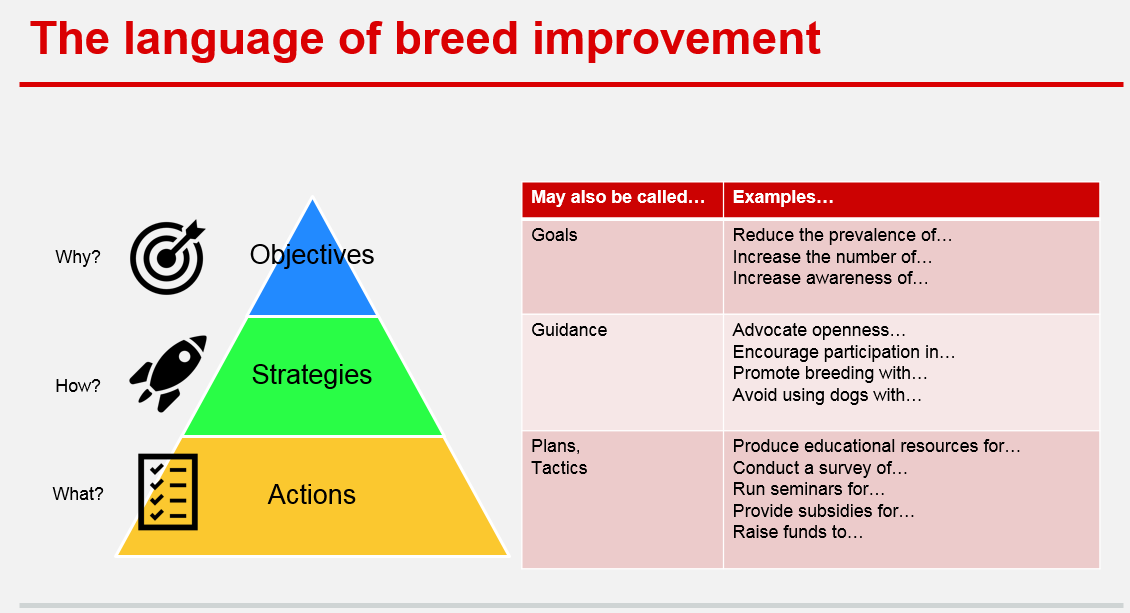 In addition to the excerpt shown above this document includes...
- Terminology
- Definitions
- Prioritisation
- Breed-specific Breeding Strategy templates
- A review of selected Breeding Strategy documents to identify common components
- Objectives and Actions examples
- The Language of Breed Improvement - goals, guidance, plans and tactics
Edited by Ann Milligan
Recommended Comments
Join the conversation
You can post now and register later. If you have an account, sign in now to post with your account.
Note: Your post will require moderator approval before it will be visible.