
Jump to content
View in the app

A better way to browse. Learn more.

DogWellNet

A full-screen app on your home screen with push notifications, badges and more.

To install this app on iOS and iPadOS
  1. Tap the Share icon in Safari
  2. Scroll the menu and tap Add to Home Screen.
  3. Tap Add in the top-right corner.
To install this app on Android
  1. Tap the 3-dot menu (⋮) in the top-right corner of the browser.
  2. Tap Add to Home screen or Install app.
  3. Confirm by tapping Install.
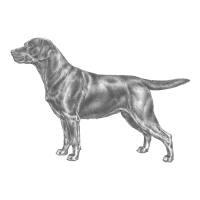
Labrador Retriever
Labradorinnoutaja
All-purpose waterdog and functional retriever, originated on the island of Newfoundland.
FCI Group Retrievers - Flushing Dogs - Water Dogs
AKC Group Sporting
TKC Group Gundog
Country of Origin GB

Brief Description

The Labrador Retriever is one of the best known and popular breeds in the world.

The Labrador Retriever originated and developed on the island of Newfoundland as an all-purpose waterdog and functional retriever. Extraordinary versatility allows Labradors to excel as hunting, service, and therapy dogs; in search and rescues; in drug and bomb detection; as family companions, and in performance and field events. (Source: Canadian Kennel Club)

Health: Most important health concerns include orthopedic, gastrointestinal, dermatologic, and cardiac conditions.

Behaviour and Well-being: Labrador Retrievers are kind and outgoing dogs, coupled with an eager-to-please nature and general non-aggressiveness.

Get a GRIHP!: Comprehensive information on the breed's health can be found in the Get a GRIHP! on the Labrador Retriever article (to be added soon).


Breed Standards

The basis of breed/conformation shows is the judging of pedigree dogs against the 'Breed Standard', which is a picture in words that describes the range of features that are deemed appropriate for the breed.

Three of the major international standards are:

Health Strategies

The Royal Kennel Club, UK

Research Projects

Dogslife - epidemiological research project about the health of Royal Kennel Club registered Labrador Retrievers born after the 1st January 2010

Parent Breed Club

Labrador Breed Council

Other breed clubs: see Connections below

Other Resources

Finnish Kennel Club Breeding Database - Labrador Retriever

Swedish Kennel Club Breeding Data (Avelsdata; in Swedish). Find the breed in the link 'Raser' on left.

Information Lacking?

We are constantly adding and updating the breed information - please contact us if you have updates, links, or other information to add!

Health Testing Requirements by Country
Skeletal and Muscular
Eye Conditions and Blindness
Autoimmune and Allergies
Cardiac and Circulatory
Dental Issues and Teeth
Ear, Deafness
Ataxia, Locomotor, and Epilepsy
Neurological and Neuromuscular
Other Genetic Testing
Renal and Urinary
Skin, Hair, and Nails
Temperament
Connections
  • Updated
Disclaimer
All materials on this site are the property of their respective authors and may not be reprinted without the author's written permission, unless otherwise indicated. The views and opinions expressed by the authors and those providing information or comments on this website are theirs alone, and do not necessarily reflect the views, opinions or positions of the International Partnership for Dogs (IPFDogs) or DogWellNet.com. We make no representations as to accuracy, completeness, timeliness, suitability or validity of any information and will not be liable for any errors, omissions, or delays in this information or any losses, injuries or damages arising from its display or use. All rights reserved. DogWellNet © 2014 - 2026
Find Us On
Contact Us
Questions? Comments? Looking to get involved in our work? We’d like to hear from you!
or if you prefer feel free to reach out to us on social media.

Powered by Invision Community

Important Information

By using this site, you agree to our Terms of Use.

Configure browser push notifications

Chrome (Android)
  1. Tap the lock icon next to the address bar.
  2. Tap Permissions → Notifications.
  3. Adjust your preference.
Chrome (Desktop)
  1. Click the padlock icon in the address bar.
  2. Select Site settings.
  3. Find Notifications and adjust your preference.